Taking the above statement as a truth, I think I should begin to thank the people for the contributions that I am directly or indirectly using as part of Prefabia.
Acknowledgements
Prefabs
- ChaunceyBillups1 : G_Mines : http://nwvault.ign.com/View.php?view=NWN2PrefabAreas.Detail&id=352
- ChaunceyBillups1 : G-Wizardlab : http://nwvault.ign.com/View.php?view=NWN2PrefabAreas.Detail&id=353
- Zach le Bon: Generic Interiors From Simaeon : http://nwvault.ign.com/View.php?view=NWN2PrefabAreas.Detail&id=230
- Hellfire : High Pass : http://nwvault.ign.com/View.php?view=NWN2PrefabAreas.Detail&id=334
- Boozehound Blue : Mountain Summit : http://nwvault.ign.com/View.php?view=NWN2PrefabAreas.Detail&id=350
- Lady Lilia/Shimmer : Temples -Evil, Neitral & Good : http://nwvault.ign.com/View.php?view=NWN2PrefabAreas.Detail&id=133
- Briesence : Ships Interiors : http://nwvault.ign.com/View.php?view=NWN2PrefabAreas.Detail&id=284
- NeVerSun : Some Mine : http://nwvault.ign.com/View.php?view=NWN2PrefabAreas.Detail&id=281
- Vordan : Vordan's Shop Wizard :http://nwvault.ign.com/View.php?view=NWN2PlugIns.Detail&id=5
- Sothis B : NWN1 area converter : http://nwvault.ign.com/View.php?view=NWN2PlugIns.Detail&id=60
- Sothis B and Seraldin : NWN2 Mapper (taken up by Sothis B) : http://nwvault.ign.com/View.php?view=NWN2PlugIns.Detail&id=62
- Sunjammer : Sunjammers Tintinator 2 : http://nwvault.ign.com/View.php?view=NWN2PlugIns.Detail&id=50
- Tani : TerraCoppa : http://nwvault.ign.com/View.php?view=NWN2PlugIns.Detail&id=25
Updating Plugins .... Tani and Grinning Fool
On another subject but one that comes about due to a scriptor moving on is updating plugins to the latest NWN2 release. Pplugins make life much easier for builders and has made Prefabia a lot more fun to build, shame NWN2 Atari did not include some of these essential tools.
Tani Provided some instructions on how to recompile the plugins to the latest version of NWN2, main thing you need is the source code.
- Grab visual c# express from m$ (it's free, the 2005 version is enough, don't know if 2008 is different). http://www.microsoft.com/express/2005/
- Grab the source code and unzip it to a folder of your liking.
- Open the project file in visual c#.
- Look for the broken references to nwn2toolset.dll and oeishared.dll, maybe others too (they are marked with an exclamation mark in a yello triangle). remove the references and add new ones to the latest version of these files.
- Compile the project, and move the new dll (found in subfolder bin/release or just bin) to your plugins folder - you should be fine.in case that was to quick take a look at the video at Link . This shows how to fix the references and compile nwn2packer and especially stripease.


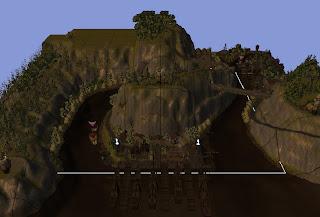


 After some quick work and tweaking the water, it is done. This area will form the starting ton for Prefabia. The area will nee some fine touch ups and wameshitig,but is prety well ready to go.